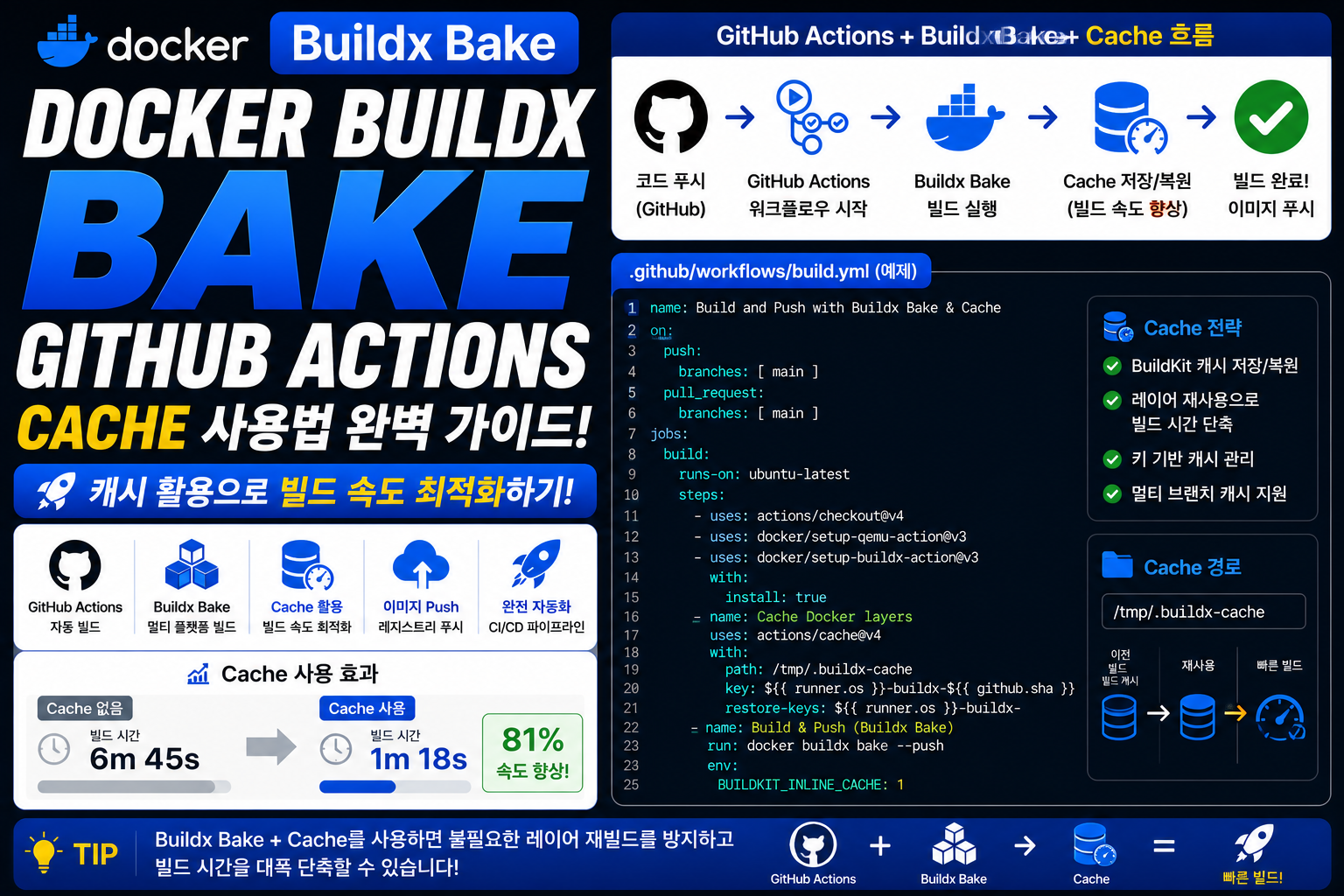
Docker 이미지를 CI/CD 환경에서 계속 빌드하다 보면 가장 큰 문제 중 하나는 빌드 시간 증가입니다.
특히 GitHub Actions 같은 CI 환경에서는 매번 새로운 Runner 환경이 생성되기 때문에 기존 Docker Layer Cache를 그대로 사용할 수 없습니다.
예:
코드 변경

↓

GitHub Actions 실행

↓

Docker Build 시작

↓

Package 설치

↓

Dependency 다운로드

↓

Image 생성
변경되지 않은 작업도 다시 실행되면서 시간이 오래 걸립니다.
Docker Buildx Bake에서는 GitHub Actions Cache(type=gha) 를 활용하여 이전 Build Cache를 저장하고 재사용할 수 있습니다.
예:
docker-bake.hcl
target "app" {

  cache-from = [
    "type=gha"
  ]

  cache-to = [
    "type=gha"
  ]

}
이렇게 설정하면 GitHub Actions Runner가 변경되어도 이전 Build Cache를 가져와 빠르게 빌드할 수 있습니다.
이번 글에서는 Docker Buildx Bake GitHub Actions Cache의 개념부터 설정 방법, Cache Mode, CI/CD 활용, Multi-platform 빌드 최적화 방법까지 자세히 알아보겠습니다.
Docker Buildx Bake GitHub Actions Cache란 무엇인가?
Docker Buildx Bake GitHub Actions Cache는 GitHub Actions 환경에서 Docker Build Cache를 저장하고 재사용하는 기능입니다.
일반적인 Docker Build Cache:
로컬 PC

↓

Docker Cache 저장

↓

다음 Build 재사용
하지만 GitHub Actions:
Runner 생성

↓

Build 실행

↓

Runner 삭제
기존 Cache가 사라집니다.
GitHub Actions Cache 사용:
Build 실행

↓

Cache 저장

↓

다음 Workflow 실행

↓

Cache 복원

↓

빠른 Build
CI 환경에서 반복 빌드 시간을 줄일 수 있습니다.
Docker Buildx Bake GitHub Actions Cache가 필요한 이유
Cache가 없는 경우:
docker buildx bake --push매번 실행:
Base Image 다운로드

↓

Package 설치

↓

Dependency 설치

↓

Application Build
문제:
- Build 시간 증가
- GitHub Actions 실행 비용 증가
- 개발 속도 저하
Cache 적용:
기존 Layer 확인

↓

변경 없는 Layer 재사용

↓

변경된 부분만 Build
장점:
- 빌드 속도 향상
- CI 비용 절감
- 서버 자원 절약
Docker Buildx Bake GitHub Actions Cache 기본 설정
docker-bake.hcl:
target "app" {

  cache-from = [
    "type=gha"
  ]

  cache-to = [
    "type=gha"
  ]

}
GitHub Actions:
- name: Build Image

  run: |

    docker buildx bake --push
동작:
GitHub Actions

↓

GHA Cache 확인

↓

Docker Build

↓

Cache 저장
Docker Buildx Bake Cache Mode 설정하기
Cache는 Mode 설정을 추가할 수 있습니다.
mode=min
기본 Cache 방식입니다.
예:
cache-to = [
  "type=gha,mode=min"
]
특징:
- 최종 결과 중심
- 저장 용량 적음
- 빠른 관리
mode=max
더 많은 Layer를 저장합니다.
예:
cache-to = [
  "type=gha,mode=max"
]
특징:
- 더 많은 Cache 저장
- 다음 Build 속도 향상
- 저장 공간 증가
비교:
| 설정 | 특징 |
|---|---|
| mode=min | 용량 절약 |
| mode=max | 최대 재사용 |
CI/CD 환경에서는 일반적으로 mode=max를 많이 사용합니다.
Docker Buildx Bake GitHub Actions Cache 실무 설정
docker-bake.hcl:
target "production" {

  tags = [
    "company/app:v1"
  ]

  cache-from = [
    "type=gha"
  ]

  cache-to = [
    "type=gha,mode=max"
  ]

}
Workflow:
name: Docker Build

on:

  push:

    branches:

      - main


jobs:

  build:

    runs-on: ubuntu-latest


    steps:

      - uses: actions/checkout@v4


      - uses: docker/setup-buildx-action@v3


      - name: Build

        run: |

          docker buildx bake production --push
Cache가 자동 저장됩니다.
Docker Buildx Bake GitHub Actions Cache와 Docker Login
Registry Push와 함께 사용하는 경우:
- name: Docker Login

  uses: docker/login-action@v3

  with:

    username: ${{ secrets.DOCKER_USERNAME }}

    password: ${{ secrets.DOCKER_PASSWORD }}
Build:
- name: Build Push

  run: |

    docker buildx bake --push
흐름:
Login

↓

Cache Load

↓

Image Build

↓

Cache Save

↓

Registry Push
Docker Buildx Bake GitHub Actions Cache Multi-platform 활용
Multi-platform Build에서도 Cache를 사용할 수 있습니다.
docker-bake.hcl:
target "app" {

  platforms = [

    "linux/amd64",

    "linux/arm64"

  ]

  cache-from = [

    "type=gha"

  ]

  cache-to = [

    "type=gha,mode=max"

  ]

}
결과:
AMD64 Build

↓

Cache 저장


ARM64 Build

↓

Cache 저장
다음 Build에서 재사용합니다.
Docker Buildx Bake GitHub Actions Cache와 Matrix 활용
여러 버전을 테스트하는 경우 Cache 효과가 큽니다.
예:
target "test" {

  matrix = {

    version = [

      "18",

      "20",

      "22"

    ]

  }


  cache-from = [

    "type=gha"

  ]


  cache-to = [

    "type=gha,mode=max"

  ]

}
결과:
Node 18 Build

Node 20 Build

Node 22 Build
공통 Layer를 재사용할 수 있습니다.
Docker Buildx Bake GitHub Actions Cache 문제 해결
Cache가 적용되지 않는 경우
확인:
docker buildx inspectBuilder 상태 확인:
docker buildx lsBuild 로그에서:
CACHED표시가 있는지 확인합니다.
Docker Buildx Bake GitHub Actions Cache 주의사항
첫 번째는 Cache 용량 제한을 고려해야 합니다.
두 번째는 너무 많은 프로젝트가 하나의 Cache를 공유하지 않도록 관리해야 합니다.
세 번째는 Cache Key 충돌을 방지해야 합니다.
네 번째는 민감한 정보는 Cache에 저장하지 않아야 합니다.
Best Practice
Docker Buildx Bake GitHub Actions Cache 활용 방법:
type=gha사용- Production은
mode=max활용 - Multi-platform과 함께 사용
- Registry Push와 연결
- Cache 범위 분리
- Build 로그 확인
자주 묻는 질문
Docker Buildx Bake GitHub Actions Cache는 무엇인가요?
GitHub Actions 환경에서 Docker Build Cache를 저장하고 재사용하는 기능입니다.
Cache를 사용하면 Image 크기가 줄어드나요?
아닙니다.
Cache는 Build 속도를 높이는 기능입니다.
GitHub Actions Runner가 새로 생성되어도 Cache를 사용할 수 있나요?
가능합니다.
GitHub Actions Cache 저장소에서 이전 Cache를 가져옵니다.
mode=max와 mode=min 차이는 무엇인가요?
mode=max는 더 많은 Build Layer를 저장하여 재사용률이 높고, mode=min은 저장 용량을 줄이는 방식입니다.
마무리
Docker Buildx Bake GitHub Actions Cache는 CI/CD 환경에서 Docker Build 속도를 크게 향상시키는 핵심 기능입니다.
매번 새롭게 생성되는 GitHub Actions Runner에서도 이전 Build 결과를 재사용할 수 있어 반복적인 Docker 이미지 생성 시간을 줄일 수 있습니다.
특히 Multi-platform Build, Matrix Build, Registry Push 환경에서는 Cache 설정을 함께 적용하면 더욱 빠르고 효율적인 Docker 자동화 환경을 구축할 수 있습니다.