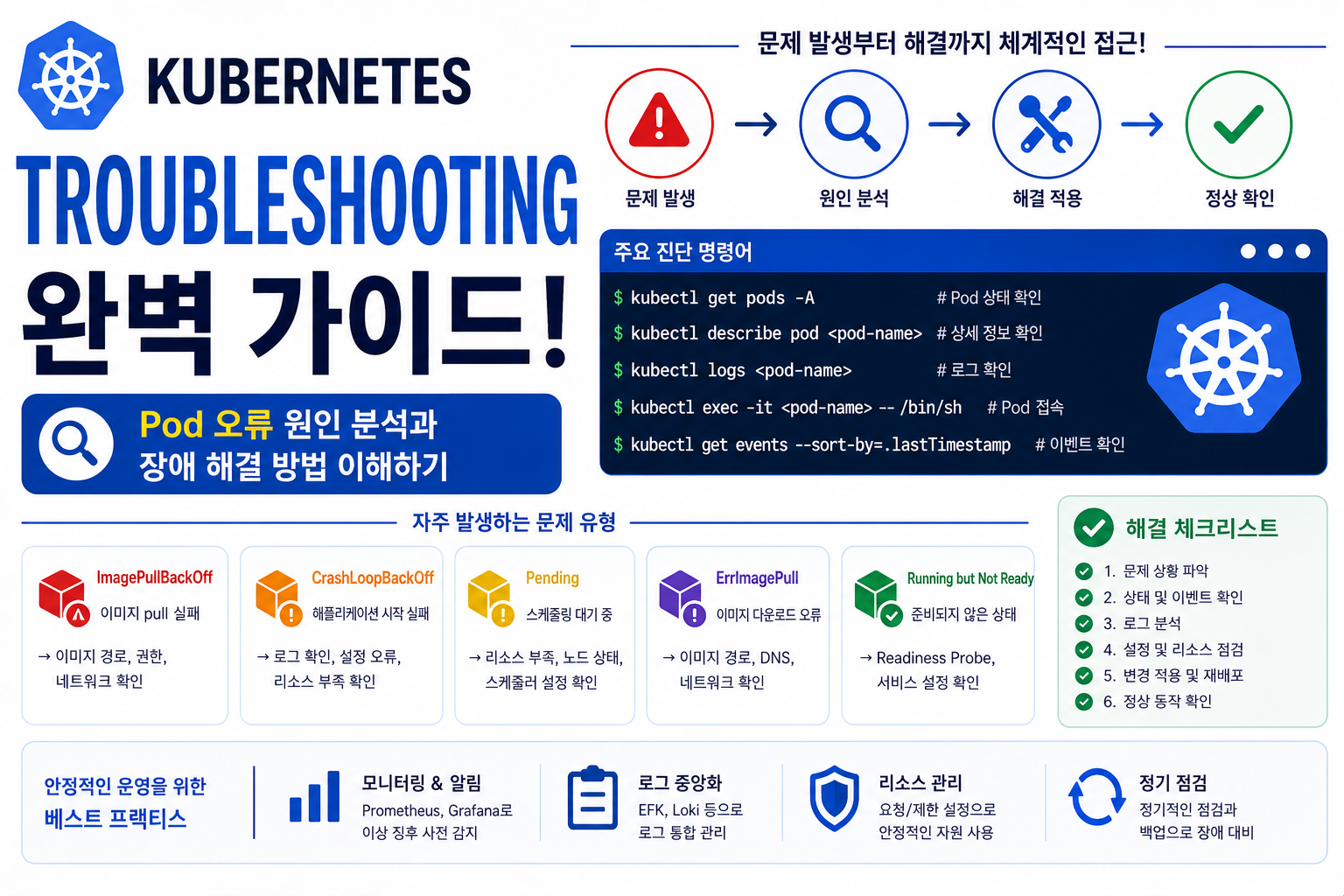
Kubernetes 환경에서 서비스를 운영하다 보면 다양한 장애 상황이 발생합니다.
Pod가 실행되지 않거나, Container가 반복적으로 재시작되거나, Network 연결이 끊기는 문제는 Production 환경에서 반드시 대응해야 하는 영역입니다.
예:
Deployment 배포
↓
Pod 생성 실패
↓
Error 발생
↓
원인 분석
↓
문제 해결
Kubernetes Troubleshooting은 단순히 오류 메시지를 확인하는 것이 아니라 Cluster 전체 구조를 이해하고 Layer별로 원인을 찾는 과정입니다.
| 영역 | 주요 확인 대상 |
|---|---|
| Pod | Container 상태 |
| Node | Resource 상태 |
| Network | 통신 문제 |
| Storage | Volume 연결 |
| Application | Log 분석 |
| Control Plane | Kubernetes Component |
장애 분석 구조를 이해하면 Kubernetes 운영 안정성을 크게 향상시킬 수 있습니다.
Kubernetes Troubleshooting이 필요한 이유
Kubernetes는 여러 Component가 연결되어 동작합니다.
구조:
kubectl
↓
API Server
↓
Scheduler
↓
kubelet
↓
Container Runtime
↓
Container
한 곳에서 문제가 발생하면 전체 Application 실행에 영향을 줄 수 있습니다.
따라서 체계적인 장애 분석 순서가 필요합니다.
Kubernetes 장애 분석 기본 순서
Production 환경에서는 다음 순서로 확인합니다.
1단계
Application 상태 확인
↓
2단계
Pod 상태 확인
↓
3단계
Event 확인
↓
4단계
Log 확인
↓
5단계
Node 상태 확인
↓
6단계
Network / Storage 확인
Layer별 접근이 중요합니다.
Kubernetes Pod 상태 확인
가장 먼저 확인하는 명령어:
kubectl get pods예:
NAME        STATUS
web-pod     Running
api-pod     CrashLoopBackOff
db-pod      Pending
Pod 상태를 통해 1차 원인을 확인합니다.
Kubernetes Describe를 활용한 장애 분석
상세 정보 확인:
kubectl describe pod pod-name확인:
- Event
- Image 상태
- Probe 결과
- Volume 연결
- Scheduling 결과
Kubernetes Troubleshooting에서 가장 중요한 명령어 중 하나입니다.
Kubernetes Event 분석
Event 확인:
kubectl get events대표 오류:
| Event | 원인 |
|---|---|
| FailedScheduling | Node 배치 실패 |
| FailedMount | Storage 문제 |
| ImagePullBackOff | Image 다운로드 실패 |
| BackOff | Container 반복 실패 |
Event는 장애 원인을 찾는 핵심 정보입니다.
Kubernetes CrashLoopBackOff 분석
CrashLoopBackOff는 Container가 반복적으로 종료되는 상태입니다.
원인:
- Application 오류
- 환경 변수 문제
- Config 오류
- Dependency 연결 실패
- Memory 부족
확인:
kubectl logs pod-nameApplication Log를 먼저 확인해야 합니다.
Kubernetes ImagePullBackOff 분석
Image를 가져오지 못하는 상태입니다.
원인:
- Image 이름 오류
- Private Registry 인증 문제
- Image 없음
- Network 문제
확인:
kubectl describe pod pod-nameEvent에서 원인을 확인합니다.
Kubernetes Pending Pod 분석
Pending은 Pod가 실행될 Node를 찾지 못한 상태입니다.
원인:
- CPU 부족
- Memory 부족
- Node Selector 문제
- Affinity 조건 오류
- ResourceQuota 초과
확인:
kubectl describe pod pod-nameKubernetes OOMKilled 분석
OOMKilled는 Memory 제한 초과 상태입니다.
흐름:
Memory 사용 증가
↓
Limit 초과
↓
Linux Kernel OOM 발생
↓
Container 종료
해결:
- Memory Limit 증가
- Application Memory 최적화
- Memory Leak 분석
Kubernetes Node 장애 분석
Node 확인:
kubectl get nodes상태:
Ready
NotReady
NotReady 원인:
- kubelet 문제
- Network 문제
- Disk 부족
- Runtime 오류
Node Layer 분석이 필요합니다.
Kubernetes kubelet 장애 분석
kubelet 상태:
systemctl status kubeletLog:
journalctl -u kubelet확인:
- API Server 연결
- Container Runtime 연결
- CNI 오류
Kubernetes Container Runtime 장애 분석
확인:
systemctl status containerdContainer 확인:
crictl ps문제:
- Container 생성 실패
- Image 실행 실패
- Runtime 오류
Kubernetes Network Troubleshooting
통신 문제가 발생하면 확인합니다.
Pod IP 확인:
kubectl get pods -o wideService 확인:
kubectl get svcDNS 확인:
nslookup service-nameNetwork Layer별 분석이 필요합니다.
Kubernetes Storage Troubleshooting
Volume 문제 확인:
PV:
kubectl get pvPVC:
kubectl get pvcMount 문제:
kubectl describe pod pod-name확인:
- StorageClass
- CSI Driver
- Permission
Kubernetes Control Plane 장애 분석
주요 Component:
- API Server
- Scheduler
- Controller Manager
- etcd
확인:
kubectl get componentstatusesControl Plane 상태를 확인합니다.
Kubernetes Troubleshooting Tools
주요 도구:
| 도구 | 목적 |
|---|---|
| kubectl | Cluster 관리 |
| crictl | Container 확인 |
| journalctl | System Log |
| tcpdump | Network 분석 |
| netshoot | Network 테스트 |
운영 환경에서 자주 사용됩니다.
Kubernetes Troubleshooting 운영 전략
Production 환경:
Monitoring 구축
↓
Alert 설정
↓
장애 분석 절차 작성
↓
Runbook 작성
↓
복구 테스트
운영 자동화 체계가 필요합니다.
Kubernetes Troubleshooting 장점
| 장점 | 설명 |
|---|---|
| 빠른 장애 대응 | 원인 분석 시간 감소 |
| 운영 안정성 | 서비스 보호 |
| 문제 예방 | 패턴 분석 가능 |
| 자동화 개선 | 운영 효율 증가 |
Troubleshooting 능력은 Kubernetes 운영자의 핵심 역량입니다.
자주 묻는 질문
Kubernetes 장애는 어디부터 확인해야 하나요?
일반적으로 Pod 상태 → Event → Log → Node → Network 순서로 확인합니다.
CrashLoopBackOff가 발생하면 Pod를 삭제해야 하나요?
먼저 Log와 Event를 확인하여 원인을 해결하는 것이 우선입니다.
Kubernetes 장애는 자동으로 복구되나요?
일부 장애는 Self-Healing으로 복구되지만 원인 분석과 설정 수정이 필요한 경우도 많습니다.
마무리
Kubernetes Troubleshooting은 Pod, Node, Network, Storage, Control Plane을 단계적으로 분석하는 운영 핵심 기술입니다.
| 분석 영역 | 확인 내용 |
|---|---|
| Pod | 상태와 Log |
| Node | Resource와 kubelet |
| Network | 통신 흐름 |
| Storage | Volume 연결 |
| Control Plane | Cluster 관리 Component |
Troubleshooting 구조를 이해하면 Kubernetes Production 환경에서 장애를 빠르게 분석하고 안정적인 서비스를 운영할 수 있습니다.
다음 글에서는 Kubernetes 운영 자동화 영역인 Kubernetes Monitoring 완벽 가이드! Prometheus와 Grafana 기반 Cluster 관찰 구조 이해하기를 진행하겠습니다.